Font Finder Chrome Extension
A Chrome extension that helps you identify fonts from images, photos, and webpages. Find matching and similar fonts in seconds, then open results on WhatFontIs.

Google Chrome
Font Identifier by WhatFontIs
Download Extension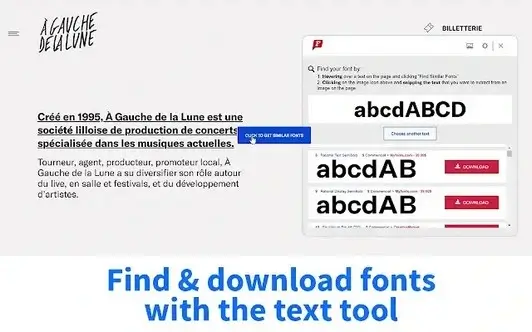
How it works
- Install the extension from the Chrome Web Store.
- Open any webpage (or image-based text where supported).
- Run the extension to detect the typeface and see similar fonts.
- Open results on WhatFontIs to compare matches and download/buy options.
Fast font identification
Detect fonts quickly and jump straight to the closest matches.
Similar & alternative fonts
Get alternative suggestions when the exact font is hard to match.
Works with WhatFontIs
Open results on WhatFontIs to browse and compare fonts easily.
Extension Help (FAQ)

Help your fellow font-seekers if you think you can recognize the font. Earn some good karma by doing it :-) Answer & Help

Yet sometimes the images are very complex, so other users need a bit of help.
If you recognize the font from the samples posted here don't be shy and help a fellow designer.
Thousands of designers (famous or not) use the image font detection system to find a font or similar free fonts from an image. Although we have the largest database of fonts, the search for a font from an image gets mixed results like the image above.
Recognize the font? Browse forumHave a font you want to use on the web?
Webfont Generator